
Bill Calendar: Payday Planner for Android
Plan bills from the balances you enter
Enter the balances of the accounts you spend from and confirm which payments, deposits and transfers those balances already include. No bank login or transaction import is required.
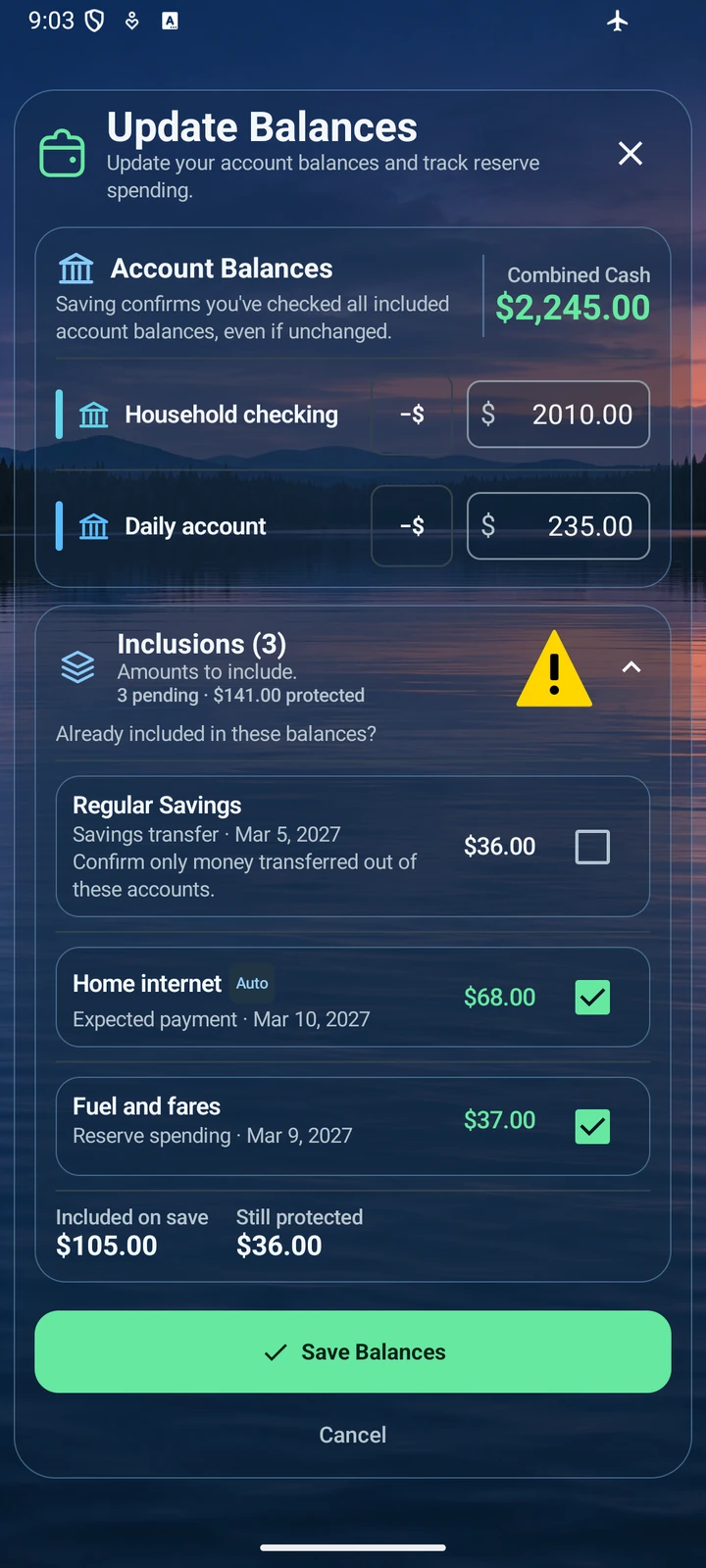
Start with the accounts that pay the bills
A checking balance can already include the internet bill while a savings transfer is still on its way. Update Balances gives you a place to tell the planner which is which.
- Check the balance of each included spending account. Leave savings already held outside those accounts out of the cash total.
- Enter the amounts together. Review pending payments, reserve purchases, savings movements and deposits against what those balances reflect.
- Save the balances, including any that stayed the same. The app records the check time and updates spending guidance.
One check across two accounts
In this example, the household checks its accounts at 9:05 a.m. on March 10. There’s $2,010 in checking and $235 in the daily spending account, for $2,245 altogether. The internet payment and fuel purchase have both cleared.
| Item | What the household sees | What to confirm |
|---|---|---|
| Home internet · $68 | Already reflected in checking | Include in the new balance |
| Fuel and fares · $37 | Already reflected in the daily account | Include in the new balance |
| Regular savings · $36 | Still inside the spending accounts | Keep it protected |
Give each dollar one job
The two cleared items add up to $105. Confirming them tells the planner the lower cash balance already reflects them. The $36 intended for savings still has a claim on that balance. Confirm its transfer when the money actually leaves the included accounts.
Common questions
Can I use my credit union or an account without an online connection?
Yes. Type the balances you can verify. The manual workflow works with an unsupported credit union and asks for neither bank credentials nor a statement file.
Can either partner update our shared checking balance?
Authorized household members can update the shared plan. Check the same account once, then allow the other phone to receive the change over the internet. Enter a joint account once in the household.
Does manual budgeting require a recurring subscription?
Try the Android planner free for 14 days. You can plan on your own phone without a payment card or sign-in. A one-time purchase unlocks continued editing. If the trial ends without a purchase, your saved plan remains available to view.