
Bill Calendar: Payday Planner for Android
Share one paycheck plan across two Android phones
Household Sync is included in Bill Calendar. You and your partner can share balances, bills, reserves, savings and spending guidance on your Android phones.
One plan for the money you spend together
If you both see the same $140 of flexible cash, an $85 purchase and a $75 purchase might look affordable to each of you. Together they exceed the plan by $20. Record the change or confirm the new balance, then check that the other phone has received it before making the second decision.
A couple can use one shared account or several included accounts. Each partner's pay can keep its own schedule. Ordinary purchases are reflected in your updated balances, so neither person needs to categorize every coffee.
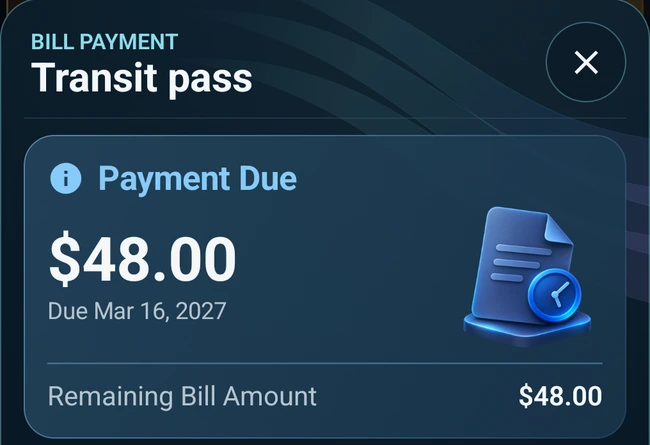
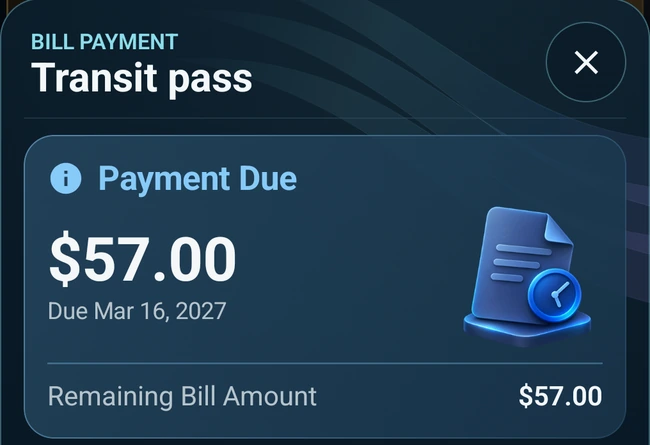
The transit pass changes from $48 to $57
In this fictional household, one partner learns that the March 16 transit pass will cost $57. The first screen shows the original $48 bill. The second shows the revised $57 amount for the same date. The household needs another $9 for transit.
If your partner’s phone is offline when you change a bill, it still shows the last amount it received. When both phones reconnect, open the bill together and check the revised amount.
Paycheck Budget PlannerGetting both partners onto the same budget
Start with the budget you intend to share. Use Household Sync setup to connect the second device and approve access to that household. On both phones, check the household name, a known bill and the last confirmed balance before using the numbers together.
- Agree which accounts belong in the joint plan, and enter each joint account once.
- Choose who confirms the next balance check. The other person can update a known bill or savings goal without repeating the balance entry.
- If either phone is offline or shows a pending change, compare the updated bill on both phones after they reconnect.
Common questions
What should we check after one phone has been offline?
Your phones need internet access to exchange household updates. When a phone is offline, it shows the plan saved on that device and the last changes it received. Reconnect, open the shared budget and verify the changed amount and latest balance check on the receiving phone. If the app requests review, finish that review before relying on the shared result.
Will my partner see the bill I marked paid?
Yes, after the change reaches the partner's shared plan. When the bank balance still includes the payment, keep it protected. At the next check, confirm whether the entered balance already reflects the debit.
Is Household Sync included in the one-time purchase?
Household Sync is included with the planner. If you and your partner use different Google accounts, check the purchase terms shown for each account in Google Play. A one-time purchase unlocks continued editing. If the trial ends without a purchase, your saved plan remains available to view.